Roles
Poelis provides 3 role types to help you control access and permissions across your workspace. Each role and permission gives team members the right level of access: from full administrative control to limited guest visibility. Administrative roles can manage workspace members and their roles from Settings > User Management. This page lists all active members.Role types
Access control
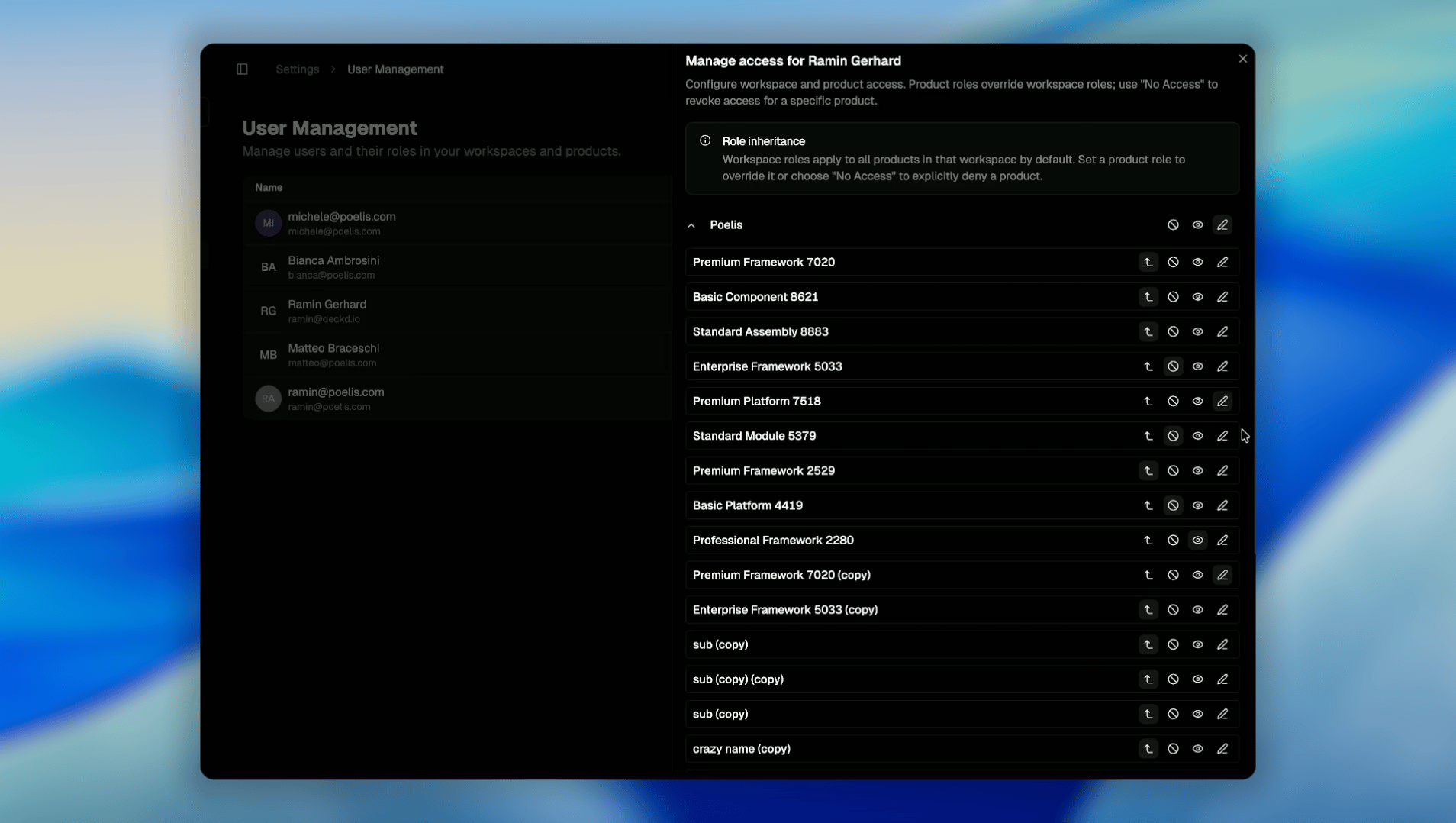
Permissions in Poelis are defined at two levels: Workspace and Product, allowing fine-grained control over who can view, modify, or act on specific elements. Workspace permissions define a user’s default access and automatically apply to all products within that workspace. Product-level roles can override workspace permissions, enabling you to grant broader access to specific products or explicitly restrict access where needed.User access levels
Users can be assigned one of the following access levels:- Editors can create, modify, and manage content within the scope of their permissions. This includes editing items, updating structures, and performing actions allowed by the product configuration.
- Viewers have read-only access. They can explore data, navigate structures, and comment, but cannot make changes or trigger actions.
- No Access: users have no visibility of these elements; they do not appear in the UI.
Change password
If you forgot your password or just want to change it, please follow the “Forgot your password” instructions.